Free · Mac menu bar app
AirPods, earbuds and mouse battery, in your Mac menu bar
Left bud, right bud and case, not just for AirPods but for JBL, Sony, Nothing and Pixel Buds too. Plus your iPhone, Apple Watch, mouse, keyboard and the Mac itself.
- Notarized by Apple
- No subscription
- No telemetry
- DMG — MB
Apple silicon (M1 or later) only. Intel Macs aren’t supported.What’s new · SHA-256
Anode runs on your Mac. Send yourself the link:
Or just open anode.tools/en on your Mac.
Download the .dmg anyway (— MB)- AirPods
- Beats
- JBL
- Sony
- Nothing
- Pixel Buds
- Jabra

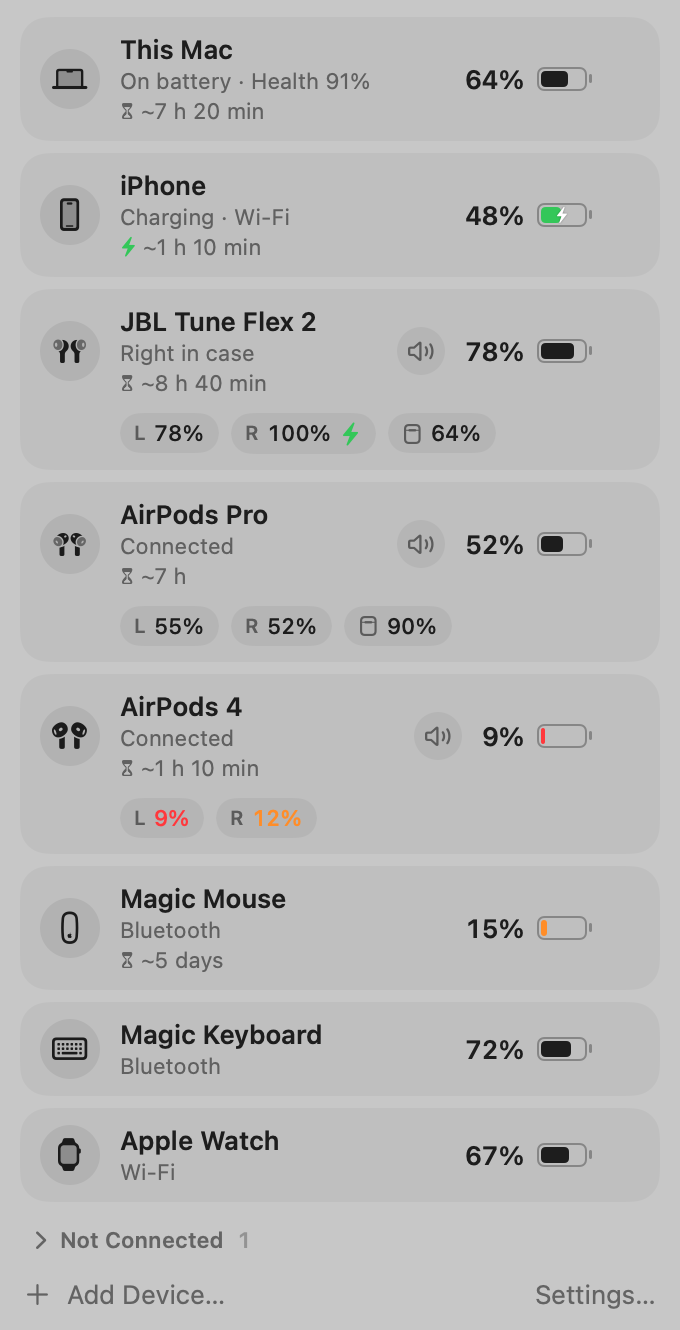
The real app window. The menu bar icon brings up whatever needs charging.
Which batteries Anode shows
Everything connected to your Mac or living next to it. Devices are found automatically, and every number shows when it was updated, so a stale reading never poses as a fresh one.
-
Wireless earbuds: left, right and case, separately
JBL, Sony, Nothing, Pixel Buds, Jabra and other earbuds with Google Fast Pair. See which bud is in your ear, which one is charging in the case, and how much the case has left.
L78%R100%Case64%The battery comes in the Fast Pair signal. The app listens to Bluetooth for 3 seconds at a time, only when needed, never continuously. -
AirPods and Beats: each bud and the case
Left, right and case: the same exact numbers macOS knows.
-
Over-ear and other headsets
The single battery level macOS reports.
-
iPhone and iPad
Over Wi-Fi with Shortcuts, over a cable (with battery health and cycle count), or over Bluetooth.
-
Apple Watch
Through its paired iPhone. Connect the iPhone to the Mac by cable once and tap Trust; after that, the same Wi-Fi network is enough.
-
Magic Mouse, keyboards and trackpads
Magic Mouse, Magic Keyboard, Magic Trackpad and other Bluetooth accessories that report their battery.
-
This Mac: battery health and cycle count
Charge, time remaining, battery condition and charge cycles.
Samsung Galaxy Buds and many Xiaomi earbuds don’t report battery over Fast Pair. For those, Anode shows the overall level if macOS provides one.
How it differs from other battery apps
Most Mac apps show one number for your earbuds, the one macOS hands them, and it’s often stuck at 100%. Anode asks the earbuds themselves.
Every bud on its own, not just AirPods
Left, right and case for Fast Pair earbuds. A bud charging in the case doesn’t hide the one in your ear.
iPhone and Apple Watch next to your earbuds
Your iPhone sends its battery over Wi-Fi with Shortcuts: scan a QR code on the Mac and you’re done. Over a cable you also get battery health and cycles.
History and forecasts
Charts for a day, a week and a month, “~7 h left”, and insights like “the left bud drains faster than the right one”.
Warns you before it dies
A notification when a battery drops below your threshold. In the morning, one reminder: what to charge today.
Keeps your sound in stereo
When headphones connect, macOS switches the mic to them and the sound turns muffled and mono, like a phone call. Anode keeps the Mac’s built-in mic unless you pick another one yourself.
Free, no account, no telemetry
No subscription, ads or sign-up. What it learns about your devices stays on your Mac.
Anode and the others: an honest comparison
What macOS and popular apps can do, and what we can’t do yet.
| Feature | Anode | Built into macOS | AirBuddy 3 | Batteries | Magic Battery |
|---|---|---|---|---|---|
| Price | Free | Free | Paid: licence or Setapp | Paid: one-time purchase | $2.99 |
| Left, right and case for AirPods and Beats | Yes | Yes, in the Bluetooth menu | Yes | Yes | Yes |
| Left, right and case for JBL, Sony, Nothing, Pixel Buds | Yes, via Fast Pair | One number or none | The one number from macOS | No | Sony and Bose, with a helper |
| iPhone / Apple Watch | Yes / via iPhone | Partly | Yes / yes | Yes / no | No |
| Battery history and forecast | 30 days | No | No | No | No |
| Low-battery notifications | Yes, plus a morning summary | For Apple mice and keyboards | Yes | Yes | Yes |
| Widgets | Not yet | Yes | Yes | Yes | No data |
| Intel Macs | No | Yes | Yes | Yes | No |
Based on the developers’ websites and the App Store, November 2026. Spotted a mistake? Write to support@anode.tools and we’ll fix it.
See it in action
Screenshots straight from the app. Light or dark, it follows your system.
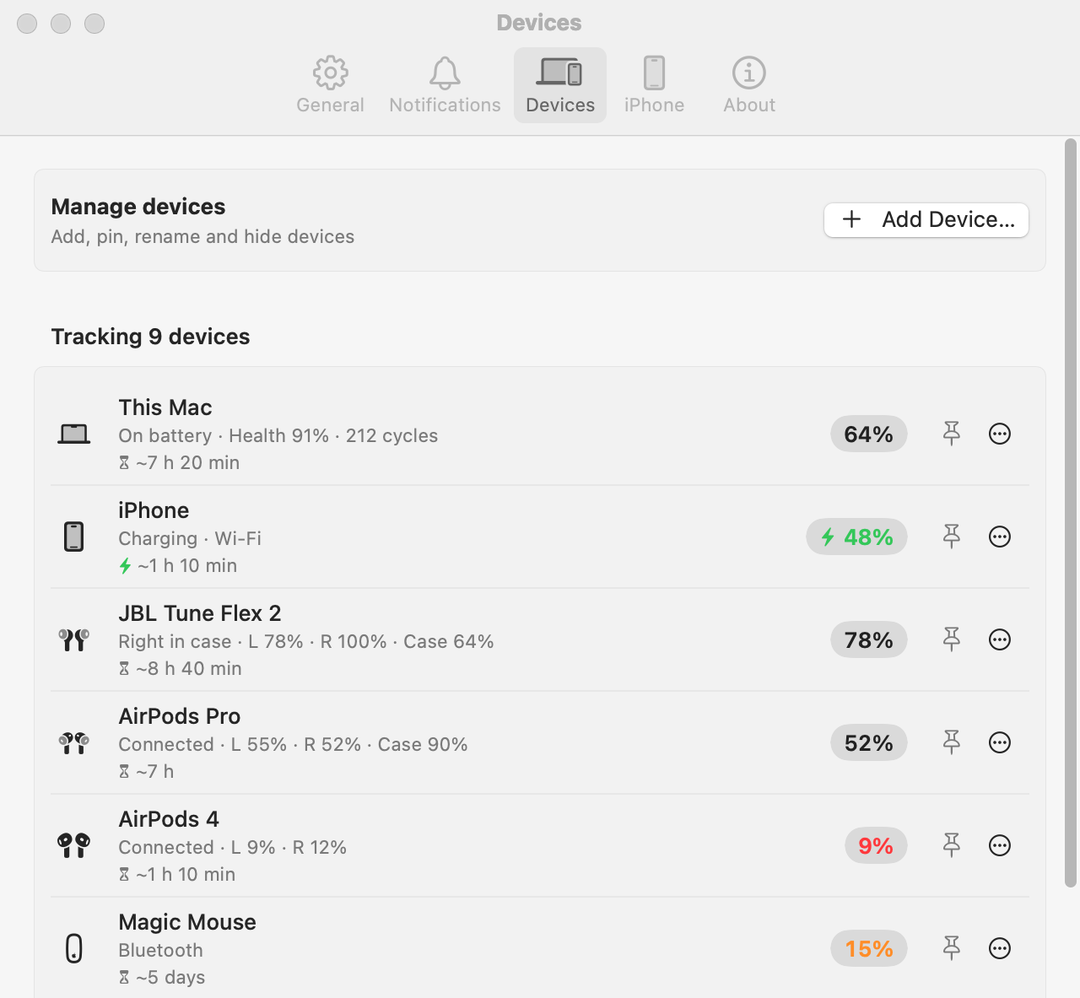
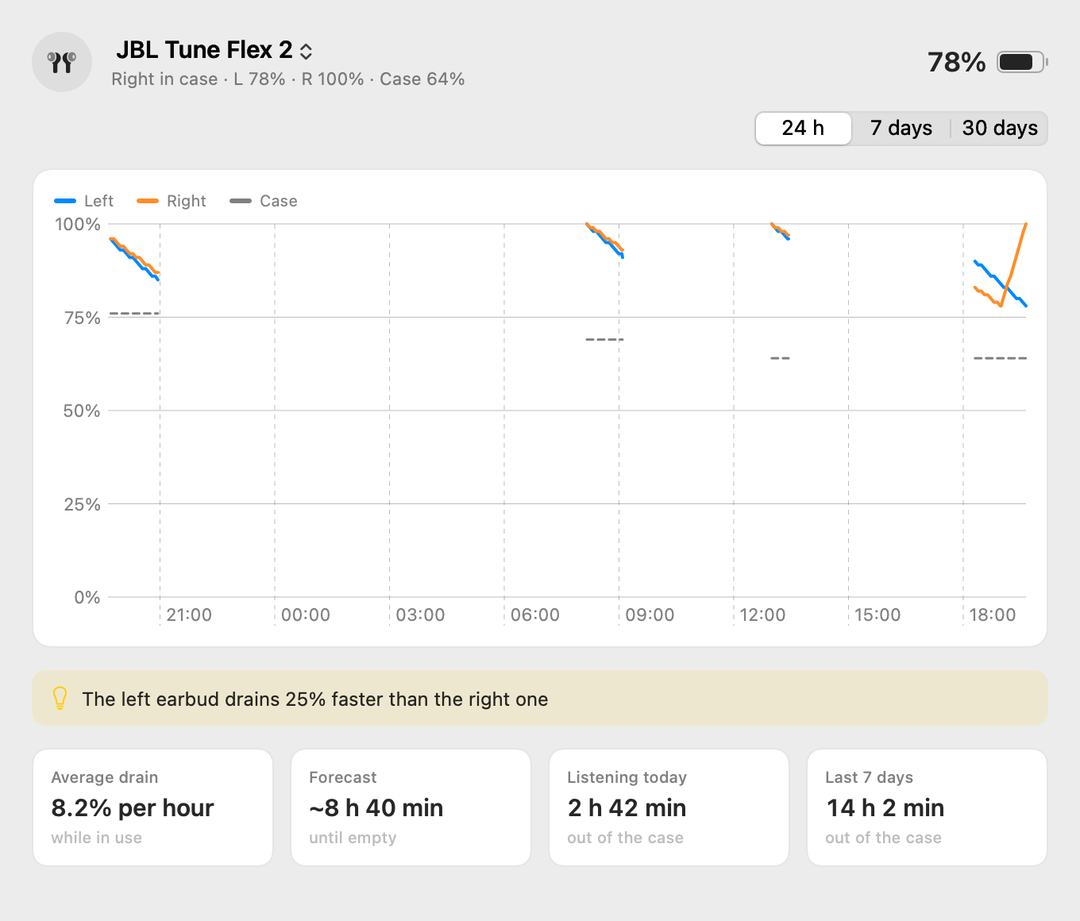
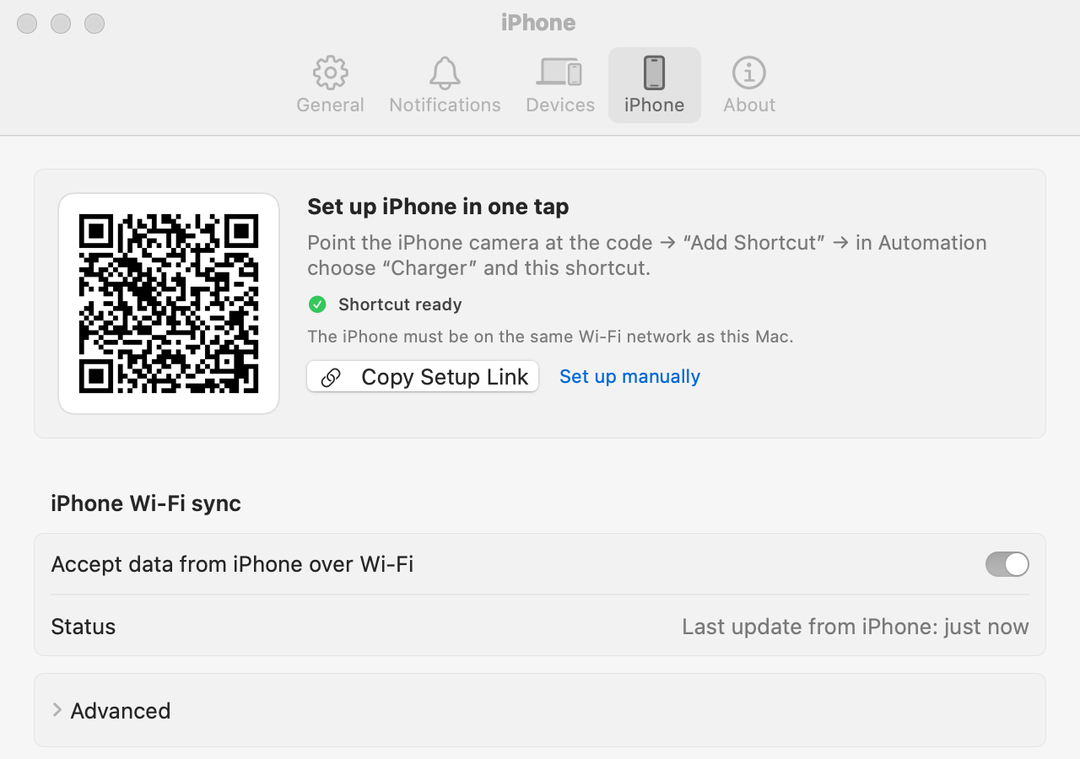
- Icon, battery and %

- Icon and %

- Icon only



The first public version is a beta
Anode has just come out, so there are no reviews yet, and we won’t make any up. Found a bug, or your earbuds don’t show left and right? Write to us with your earbuds model, macOS version and Mac model. The app’s log is in ~/Library/Logs/Anode; it contains no secrets.
The app doesn’t collect your data
No account, no analytics, no ads. Everything Anode learns about your devices stays on your Mac.
Stays on your Mac
- 30 days of battery history
- Device names and settings
- A diagnostic log, kept locally only
Travels only over your home network
- Your iPhone’s battery, only if you turn on iPhone sync. It’s off by default.
- While it’s on, the Mac accepts requests on port 8920, only from your local network and only with the secret token. Turn sync off and the port closes.
- No cloud: the iPhone sends it straight to the Mac
Goes to the internet
- Only the update check: asking for the latest version number and downloading the update
- No device names, battery levels or identifiers
The details are in the privacy policy. The site sets no cookies and uses no analytics. We only count file downloads (version, country as reported by Cloudflare, link source), with no IP addresses or identifiers.
Up and running in a minute
Download and drag
Open the downloaded .dmg and drag Anode into Applications.
Open it
macOS asks “Open?” once, as for any app from the internet. The app is signed and notarized by Apple. The icon appears in the menu bar; there’s no Dock icon.
Allow Bluetooth
Without it the app can’t see your earbuds and mice. Devices connected to your Mac show up on their own.
Allow notifications (optional)
For low-battery alerts and the morning summary.
Get Anode
Free, no subscription. Updates itself.
- Notarized by Apple
- No subscription
- No telemetry
- DMG — MB
Apple silicon (M1 or later) only. Intel Macs aren’t supported.What’s new · SHA-256
Anode runs on your Mac. Send yourself the link:
Or just open anode.tools/en on your Mac.
Download the .dmg anyway (— MB)Frequently asked questions
How do I check my AirPods battery on a Mac?
Without any app: open the Bluetooth menu in the menu bar or Control Center. For connected AirPods and Beats it shows the left bud, right bud and case; other headsets usually get one number or none.
Anode keeps the battery visible in the menu bar all the time and shows the left bud, right bud and case for JBL, Sony, Nothing, Pixel Buds and Jabra earbuds too. When a battery drops below your threshold, you get a notification.
Which earbuds show the left and right bud separately?
AirPods and Beats, plus earbuds with Google Fast Pair that report their battery: JBL, Sony, Nothing, Pixel Buds, Jabra and others. If the earbuds allow it, Anode also tries a direct Fast Pair connection once, which adds the charging state of each bud.
Other headsets, including Samsung Galaxy Buds and many Xiaomi models, get the single level macOS reports.
How do I see my Magic Mouse or keyboard battery percentage?
macOS shows it in the Bluetooth menu. Anode puts the battery of your Magic Mouse, Magic Keyboard, Magic Trackpad and other Bluetooth mice and keyboards that report it right in the menu bar, notifies you at a threshold you choose, and keeps a drain history.
How do I check MacBook battery health and cycle count?
In macOS: System Settings → Battery → the (i) button next to Battery Health. The cycle count is in System Information: hold Option, open the Apple menu, choose System Information → Power → Cycle Count.
Anode shows battery health and cycle count next to your Mac’s charge, no digging through settings. The same goes for an iPhone connected by cable.
How do I show the battery percentage in the Mac menu bar?
System Settings → Control Center → Battery → Show Percentage. Anode adds the percentages of everything else next to it: earbuds, mouse, iPhone and Apple Watch.
How is Anode different from AirBuddy, coconutBattery and AlDente?
AirBuddy is built mainly for AirPods and Beats, coconutBattery for the battery health of your Mac, iPhone and iPad, and AlDente for limiting how far your MacBook charges.
Anode puts every device’s battery in one place, shows each bud and the case for Fast Pair earbuds (JBL, Sony, Nothing, Pixel Buds), and is free. It does not limit charging; for that, use AlDente or the Optimized Battery Charging built into macOS. See the comparison table.
Which Macs does it run on?
Apple silicon Macs only (M1 or later). Intel Macs aren’t supported. It needs macOS 14 Sonoma or later, including macOS 26 and 27.
Is it really free? What’s the catch?
It’s free: no subscription, ads, trial or sign-up. It’s made by one developer, for himself and for everyone whose earbuds aren’t AirPods. No payment, no data collection.
How much battery and CPU does it use?
Very little. It never scans Bluetooth continuously: it listens for 3 seconds at a time, and only when earbuds lack fresh data — every 90 seconds when idle, at most once every 7 minutes while audio plays. The rest of the time it simply waits for events from macOS.
What happens on first launch?
macOS asks whether you want to open an app downloaded from the internet; click Open. You won’t see “cannot verify the developer”: the app is signed with a Developer ID certificate and notarized by Apple.
Then the app asks for Bluetooth access and, optionally, notifications. Anode lives in the menu bar and has no Dock icon. If you open it from somewhere other than Applications, it offers to move itself there; otherwise updates can’t install.
Why does it ask for Bluetooth?
To read the battery of your earbuds, mice and keyboards. If you said no, you can turn it on later in System Settings → Privacy & Security → Bluetooth. Without it you still get your Mac and your iPhone over Wi-Fi.
Why does it ask for local network access?
Only for your iPhone’s battery over Wi-Fi. iPhone sync is off by default; until you turn it on, the app doesn’t listen on the network.
While it’s on, the Mac accepts requests on port 8920, only on your local network and only with the secret token. The macOS firewall may ask once whether to allow incoming connections. Turn sync off and the port closes. If you don’t need the iPhone over Wi-Fi, you can decline.
How do I connect my iPhone?
- On the Mac, open Anode → Settings → iPhone and turn on accepting iPhone data over Wi-Fi. The Mac and the iPhone need to be on the same Wi-Fi network.
- Point the iPhone camera at the QR code and open the link. Tap Add Shortcut.
- In Shortcuts → Automation → “+”, choose the Charger trigger (connected and disconnected) or Battery Level, pick the shortcut you just added, and turn on Run Immediately.
A cable works too: plug the iPhone into the Mac and tap Trust. Then you also see battery health, cycle count and the Apple Watch paired with that iPhone.
How do updates work?
On their own. Anode checks for a new version, downloads it and installs it. Every version is signed with a Developer ID certificate and notarized by Apple. You can turn automatic updates off in Settings. The changes and the installer’s SHA-256 are on the What’s new page.
How do I report a problem?
Write to support@anode.tools with your earbuds model, macOS version and Mac model. If you can, attach the log from ~/Library/Logs/Anode: it contains no secrets or tokens.
How do I uninstall it?
Choose Quit from the icon’s menu and drag the app from Applications to the Trash. Battery history lives in ~/Library/Application Support/Anode and the log in ~/Library/Logs/Anode; delete those folders by hand if you like.